
How Microsoft SSO Works
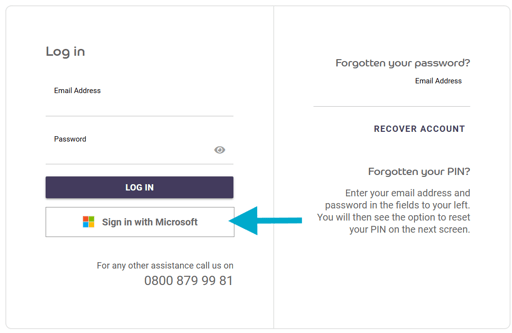
- Go to the BCarm login page.
- Enter your email address.
- Select Sign in with Microsoft.
- If you’re already signed into Microsoft on your device, you’ll be logged straight into BCarm.
- If it’s your first time, Microsoft may ask you to confirm your email or complete Multi‑Factor Authentication (MFA).
That’s it - once set up, future logins are usually one click.
Linking Your Microsoft Account to BCarm (If Needed)
If your Microsoft email address is different from your BCarm login email, you can link them:
- Log in to BCarm the usual way using your BCarm email and password.
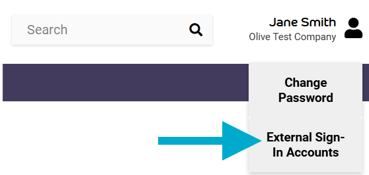
- Click on your name in the top‑right corner.
- Select External Sign-In Accounts.
- Choose Link Microsoft Account.
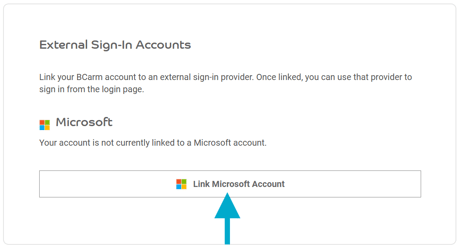
- This will link the Microsoft account you're currently signed in as, and your BCarm account.
After linking, you can use Microsoft SSO for future logins.
Unlinking Your Microsoft Account
If you ever need to switch to a different Microsoft account:
- Go to External Sign-In Accounts in BCarm.
- Select Unlink Microsoft Account.
You can still log in to BCarm using your usual email and password - Microsoft SSO is simply an optional, convenient alternative for users who want a quicker login, and may not be suitable for everyone (for example, those using shared devices).
Need Help?
If you experience any issues or something doesn’t look right, our Helpdesk is here to support you.
0800 879 99 81 or info@bcarm.co.uk